
KNN – A Lazy Model
KNN i.e. K-Nearest Neighbors Model is a Non-Linear ML Model that’s mostly used for Classification, but can also be used for Regression.
Once we identify the nearest neighbors then, In Classification we uses majority voting, and In Regression we uses Average value approach for final prediction.
Here the training phase is of not much use as Its a Non-Parametric Model i.e. it learns no parameter during training phase. It can just find the best distance function to use based on feature’s data types if not explicitly defined. By Default it uses Euclidean Distance [i.e. minkowski with degree 2]
KNN is a Lazy Learner/Model as its quite slow during testing/inference phase and it becomes slower with increased dimensions and observations. Also it has to store all training data into RAM/memory making it more costly to use.
- Algorithms in KNN model:
- Brute Force
- KD Tree
- Ball Tree
Python Program for KNN Model
from sklearn.model_selection import train_test_split
# Split dataset into training set and test set

X_train, X_test, y_train, y_test = train_test_split(wine.data, wine.target, test_size=0.3, random_state=100)
#Import k-nearest neighbors Classifier model
from sklearn.neighbors import KNeighborsClassifier, RadiusNeighborsClassifier
#Create KNN Classifier (with K = 5) - K should always be odd
#creating an Object here
knn = KNeighborsClassifier(n_neighbors=5, metric='minkowski', p=2)
# p=2 means euclidean distance
#Train the model using the training sets

knn.fit(X_train, y_train)
# Train accuracy
knn.score(X_train, y_train)
#Predict the response for test dataset

y_pred = knn.predict(X_test)
#Test Accuracy
#Import scikit-learn metrics module for accuracy calculation

from sklearn import metrics
# Model Accuracy, how often is the classifier correct?

print("Accuracy:", metrics.accuracy_score(y_test, y_pred))
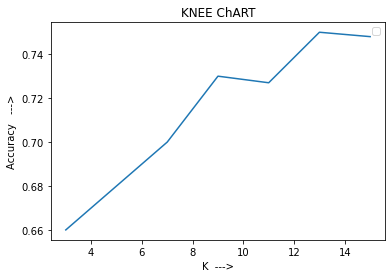
Finding best value of K [i.e. n_neighbors] using:

1. ELBOW CHART
2. KNEE CHART
3. Silhouette curve [also used for finding K in K-means clustering]
# KNEE ChART
import matplotlib.pyplot as plt
import seaborn as sns
k = [3,5,7,9,11,13,15]
#train_accuracy=[.83,.80,.78,.799,.78, .79,.799]
test_accuracy=[.66,.68,.70,.73,.727, .75,.748]
plt.xlabel('K --->')
plt.ylabel('Accuracy --->')
plt.title('KNEE ChART')
#sns.lineplot( k, train_accuracy)
sns.lineplot( k, test_accuracy)
plt.legend()
Types of Distance Formulas
Numeric -

1. euclidean
2. manhattan
3. minkowski (Generic Form)
4. mahalanobis (Complex Function)
Categorical -

Simplest ones
1. Hamming Distance
2. Levenshtein distance (edit distance)
Categorical -
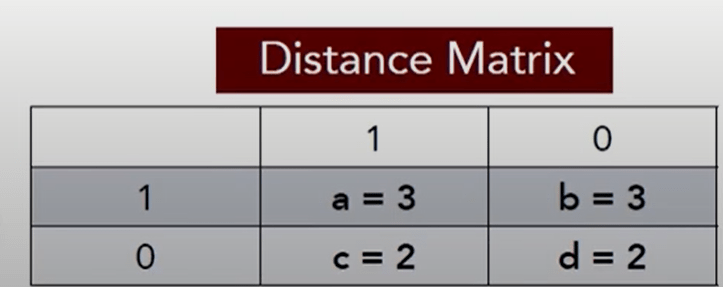
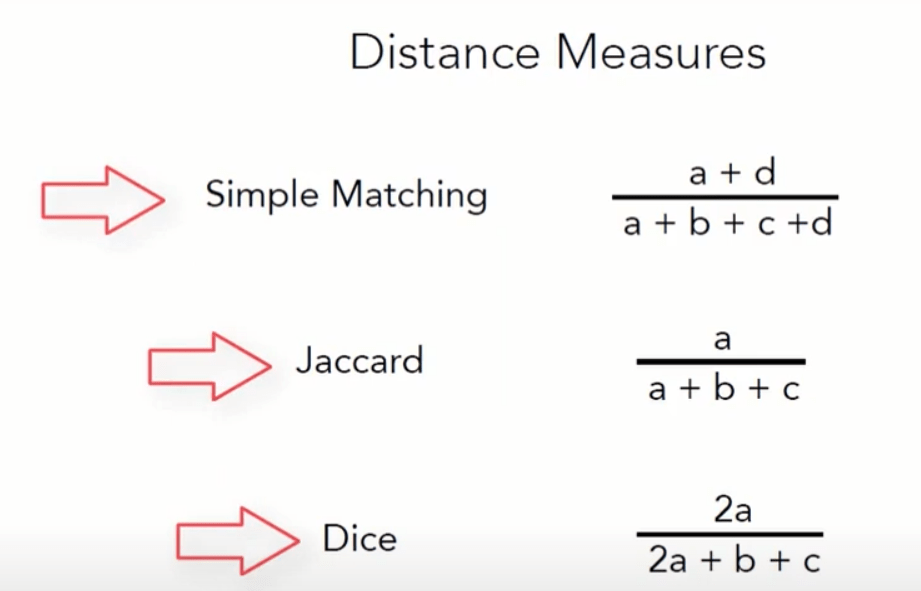
Distance Matrix Approach
1. Simple Matching
2. Jaccard similarity
3. Dice's coefficient
Categorical -
Vector Algebra Approach (dot product of 2 vectors and l2 norm of a vector)
1. Tanimoto coefficient/similarity -- higher the better
Categorical -

Advance Formulas
1. Locality Sensitive Hashing (LSH)
2. Cosine similarity
Mixed Data [Numerical + Categorical] -
1. Daisy Function
Leave a Reply