
Linear Regression Using Python
Linear Regression is one of the important model to be used when predicting a numerical target variable using given input variables. For example, in below dataset we want to predict expenses i.e. Insurance Premium amount using the given feature space.
Given below is Insurance Dataset, that can be downloaded from Kaggle
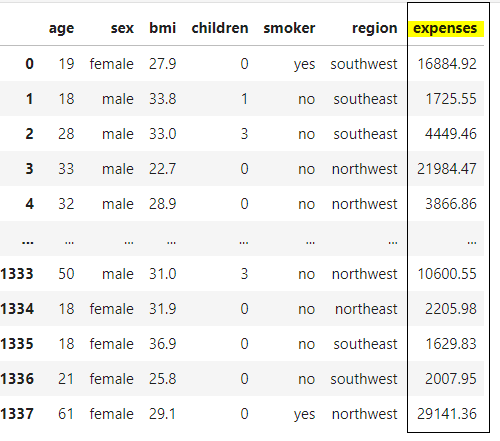
Ideally we first start with Feature Engineering :
It is the set of steps to be used to clean and enrich the data to make it ready for ML model training –
- Duplicate removal
- Missing Value Imputation
- Outlier Detection
- BoxPlot
- Chebysev’s Theorem
- Encoding – Categorical to Discrete Numerical Conversion
- Scaling
- Correlation Analysis
- Feature Selection
- Forward Selection
- Backward Selection
- Dimensionality Reduction
- PCA
- t-SNE
#Python classes for Data Encoding

from sklearn.preprocessing import LabelEncoder, OrdinalEncoder, OneHotEncoder
#Python classes for Data Scaling

from sklearn.preprocessing import MinMaxScaler, MaxAbsScaler, RobustScaler, StandardScaler
Here we start with ML Model:
Phase 1: Model Training
In this phase we have to train the model so that it can learn the hidden patterns in the data for constructing the mathematical equation, in this case the Linear Equation between the dependent and independent variables
#creating object of python class LinearRegression

from sklearn.linear_model
 import LinearRegression()

lr = LinearRegression()

#training the model here on Train dataset

lr.fit(train_X,train_Y)
Phase 2: Model Testing
In this phase we want to test the model, i.e. to test whether the patterns learned by model are good enough for future predictions or its just a Random Guess Model
#testing the model trained in previous step i.e. object lr

predicted_expenses = lr.predict(test_X)


#error analysis to see variance in actuals vs predicted values

actuals_expenses = test_Y
error = actuals_expenses - predicted_expenses
Test Error Metrics – COST Function or LOSS Function
The AIM is to always minimize the LOSS Function, so as to increase the Accuracy of the Model
#python modules for error analysis

from sklearn.metrics import mean_absolute_error, mean_absolute_percentage_error, mean_squared_error
#There are multiple error function, we are calculating MSE and RMSE here

#MSE - mean squared error

mse= mean_squared_error(actuals_expenses, predictions_expenses)


#RMSE - Root mean squared error

import math
rmse=math.sqrt(mse)
print(mse,"  ,  ",rmse)
Accuracy Analysis
The final step is to check the Test Accuracy, so as to identify whether the model is Underfit, Overfit, or Good enough to pass on to production phase
#R2 score is the accuracy for Linear Regression, also called Coefficient of Determination

from sklearn.metrics import r2_score

print(r2_score(actuals_expenses, predictions_expenses))

1 comment so far